EDA093 : tirK8

Processes
Lecture 1, course in operating systems
 Markdown
- We run several processes at the same time
- false, it feels like we run several processes at the same time
- One CPU can only run one program at the same time
- false, each CPU core can only run one process at the same time
Context Switching
Is about saving information about the current process, and then loading new information about the new process in order to switch from executing / running one to the other.
We save the information about the processes into something called the process context block (PCB). This is what we load from and to. There are two primary states a process can be in, which is either executing or idleing. The scheduler (process that determines the process schedule, when what process should run or idle) can only pick idle proccess, not processes that are already executing.
Process Concept
A process is a program in execution, process execution progresses in a sequential fashion. A program is something passive stored on disk, it is in some way the blueprint for what the process should be like. The blueprint (program) can create multiple processes, not just one.
Process Memory Layout
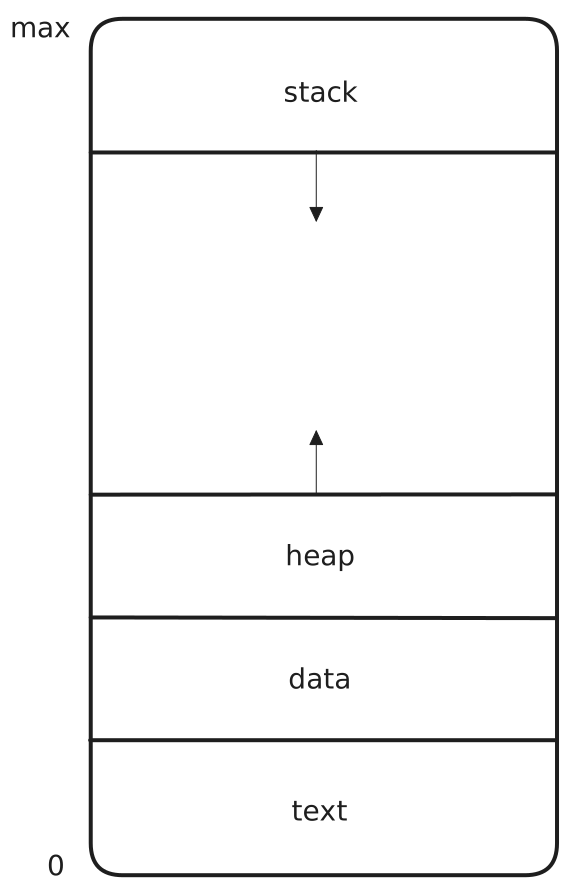
The memory of the process consists of multiple parts.
- Text Section — Where the machine instructions are stored.
- Data Section — Where the global variables are stored.
- Heap — Where dynamically allocated memory is stored.
- Stack — Where temporary data is stored like function parameters, return addresses etc.
Diagram of Process State

When a process is executing, depending on what instructions it executes, it may change the state its in from the viewpoint of the operating system. The possible states it can be in are the following.
- New — The process is in the process of being created.
- Ready — The process has been created and is wating to be assigned to a processor to start executing.
- Running — The instructions which the program specified for the process are being executed.
- Waiting — The process executed some blocking instruction, like an I/O operation, thus it is waiting for that event to occur / complete.
- Terminated — The process stopped executing.
While you wait for things like I/O operations, the operating system may run other things in the meantime, this is to save time instead of just doing nothing.
Context Switching and the Process Context Block
When a CPU switches between executing different processes, the operating system must in some way save the state the process was in at the instant it was switched away from in order to properly resume it as if it just kept going. The context is saved in the so called PCB. Context-switching is a time costly procedure so the operating system should want to minimize the number of said switches. Context-switching speed may also vary a lot on hardware, where some hardware provides multiple set of registers on the CPU in order to accomodate multiple context switches at once.
One very important example of information that the PCB stores is the program counter (PC) of the process. This to know the next instruction the process should execute.
Process Scheduling
The datastructures you pick has a lot to do with the time and space complexity of the algorithm that is using the datastructure. Usually, you want to optimize the datastructure in accordance with how the algorithm accesses the data. The question then becomes, what is the datastructure of the PCB?
You could try to have one list of all the PCBs and perform linear search on the list to find PCBs that state that the process is ready and then execute them. However, in practice this would be very inefficient and slow.
What you do instead is that you have multiple “lists” which are essentially queues.
Ready Queue and Various I/O Device Queues
Having a queue removes the need to search, you just pick what’s up next in the queue. You also use multiple organized lists / queues that are for things like waiting lines to different I/O devices etc.
Note: There can be multiple PCBs reffering to the same process present in multiple queues at once. However, the smallest granularity is for one thread. That is, a thread, may not be in multiple queues at the same time.
The Scheduler
The scheduler is a process that belongs to the operating system. There are multiples types of schedulers.
- Short-term scheduler / CPU scheduler
- Selects which processes should be executed next and allocates CPU for said processes
- Invoked very frequently (milliseconds), therefore must be very efficient / fast
- Long-term scheduler / job scheduler
- Invoked pretty infrequently (seconds), does not need to be very optimized
- Controls the degree of multiprogramming
Questions
The instruction to be run next when process X is scheduled is maintained in?
- The text section
- The data section
- The process control block
Well, you could say that its maintained in the PCB because the PCB is what stores the program counter which tells you which instruction to execute. However, the text section is what stores the actual instruction itself.
Which of the following state switch is not valid?
- Ready \(\rightarrow\) Running
- Running \(\rightarrow\) Ready
- Running \(\rightarrow\) Waiting
- Ready \(\rightarrow\) Waiting
Number 4 is not valid since to be Ready means that the process was just created and has not entered a state of Running / Executing yet. Therefore it could not have executed an instruction which would have transitioned into a Waiting state.
During a context switch, what is saved by the OS (to be later re-loaded) is?
- The PCB of the process
- The PCB and the memory of the process
- The memory of the process
Number 1, the PCB, it stores all the necessary data in order to perform a context switch.
Operations on Processes
The operating system must provide basic operations such as
- Process creation
- Process termination
- …
These by themselves are simple concepts, the complexity comes from the fact that you need a process to run in the first place (operating system) to create a new process, but how does the switch happen? How do you hand execution to another process and then switch back to the operating system in order to switch to another process.
Process Creation
Processes are organized in a tree strucuture, that is, there exists a root process from which everything else branches from. Parent processes create child processes, which in turn, become parents to their children. A process is identified by its PID (process id). These parent and child processes have resources, but they are different processes, so one must decide on some schema for how the resources (memory, file descriptors etc) are shared. The options you could pick between are
- Parent and child share all resources
- Children share a subset of the parents resources
- Parent and child share no resources at all
There are options you could pick between regarding how parent and child execute their instructions.
- Parent and children execute concurrently
- Parent wait (blocks) until child terminates.
As said before, processes are organized in a tree structure. If you were to run the command ps -el or pstree -el you would get something like this.
XXXXXXXXXX:~$ pstree -pl
init(1)-+-NetworkManager(1215)-+-dhclient(3386)
| |-dnsmasq(3390)
| |-{NetworkManager}(1224)
| `-{NetworkManager}(2164)
|-accounts-daemon(1527)---{accounts-daemon}(1530)
|-acpid(1360)
|-apache2(16861)-+-apache2(2458)
| |-apache2(2460)
| |-apache2(2461)
| |-apache2(2462)
| |-apache2(2463)
| |-apache2(2464)
| |-apache2(4079)
| |-apache2(4082)
| |-apache2(5464)
| |-apache2(5465)
| `-apache2(5466)
|-at-spi-bus-laun(3570)-+-dbus-daemon(3576)
...
which prints out the process hierarchy.
Forking
The fork() system call creates new proccess by copying / duplicating the proccess which called fork(). The copy and original process are identical in almost every single way, but they are still seperate processes and treated as completely different by the operating system. Forking will make the process making the system call go into waiting, this because it needs to wait for the operating system to duplicate itself before it can continue executing.
Once done, the process is copied and the original process executes as if nothing happened.
#include <sys/types.h>
#include <stdio.h>
#include <unistd.h>

int main() {
    pid_t pid;

    /* fork the execution of the process here */
    pid = fork();

    if(pid < 0) {
        /* pid is zero or a positive integer, if its less than one,
           something went wrong
         */
        printf("fork failed\n");
        return EXIT_FAILURE;
    } else if(pid == 0) {
        /* the copy of the process which has the value of 0 for the
           pid variable is the child process, we check if we are the
           child, if we are, execute something
        */
        execlp("/bin/ls", "ls", NULL);
    } else {
        /* if the pid is not zero, then we are the parent, in which
           case we simply in this case wait for the child do complete
           whatever thing it wanted to do
        */
        wait(NULL);
        printf("child complete\n");
    }

    return 0;
}
Just as a note, the process id for the child is not actually 0 from the perspective of the operating system or the parent process. The value for pid from the perspective of the parent is the actual pid of the child. However, from the perspective of the child its 0, this is just so that the child can know that it is the child.
Process Termination
The operating system essentially just decides that the process should no longer execute instructions and therefore cleans up all the data related to the process and stop executing it. Some operating systems do not allow that child processes of a terminated parent process to keep executing. This is called cascading termination, terminating the parent consequently terminates all processes it has spawned. The parent process may use the wait() system call in order to wait for all child processes to terminate before terminating. This system call returns status information and the pid of the terminated process.
Zombies
A child can become a “zombie” when the parent does not wait() to reap the child process.
Orphans
An orphan process is when the parent process has terminated before the child process and the child process keeps on executing.
Multiprocess Architecture
Many web-browsers like Chrome use a multiprocess architecture where each tab in the browser is its own independent process. This is somewhat of a perfect usecase of fork() because each tab is indentical when created but become different as time goes on. The big advantage to multiprocess architecture is seen in the browser, that is, if one tab were to crash / freeze then none of the other tabs would be affected. If they were all running under one process, then one tab could mess all of the other ones upp. It can also potentially introduce security issues.
Interprocess Communication (IPC)
There are two main types of interprocess communication.
- Message Passing (via the operating system)
- More reliable, managed by the operating system (assumed to be reliable)
- Takes more time, is slower, requires system calls
- Shared Memory
- Faster, does not require system calls
- Less secure, a lot depends on the programmer, synchronization issues could occur etc.
Pipes
One very common type of IPC is the pipe.
Here we create a pipe from ls to grep by putting | inbetween. The stdout (standard output) from ls is pipeed into the stdin (standard input) of the grep command.
Example : Ordinary Pipes
int main(void) {
    char write_msg[BUFFER_SIZE] = "Greetings";
    char read_msg[BUFFER_SIZE];

    pid_t pid;

    int fd[2];

    if(pipe(fd) == -1) {
        printf("pipe could not be created\n");
        return EXIT_FAILURE;
    }

    pid = fork();

    if(pid < 0) {
        printf("fork failed");
        return EXIT_FAILURE;
    } else if(pid > 0) {
        close(fd[READ_END]);
        write(fd[WRITE_END], write_msg, strlen(write_msg)+1);
        close(fd[WRITE_END]);
    } else {
        close(fd[WRITE_END]);
        read(fd[READ_END], read_msg, BUFFER_SIZE);
        printf("read: %s\n", read_msg);
        close(fd[READ_END]);
    }

    return 0;
}
Questions
pid = fork();

if(pid < 0) {
    // instruction 1
} else if(pid == 0) {
    // instruction 2
} else {
    // instruction 3
}
Which of the following affirmation is false?
- Instruction 1 can be executed by the parent and the child process
- Instruction 2 can be executed by the parent process
- Instruction 3 can be executed by the child process
Option 1 is false because you enter into if(pid < 0) it means that the fork failed, so there is no child process. Option 2 is false because pid == 0 would only be true if the child was executing the code, not the parent. Option 3 is true.
Which type of pipes requires a parent-child relation between two processes?
Ordinary, named pipes are for processes that do not “inherently know of eachother”.
#include <stdio.h>
#include <unistd.h>

int main() {
    for(int i = 0; i < 4; i++) {
        fork();
    }

    return 0;
}
Including the initial parent process, how many processes are created by this code?
16 processes are created, since each fork will also start forking.